


Description
Who it’s for
The LiteRadio 2 SE on this listing is the FrSky version: a palm-sized, gamepad-style transmitter with a CC2500 radio chip that speaks FrSky D8, FrSky D16 and Futaba S-FHSS. That matters more than anything else on this page. It is the right buy if you already own a tiny whoop or toothpick with a FrSky SPI or D8 receiver, if someone handed you an older bind-and-fly quad, or if you mainly want an inexpensive USB controller for simulators. It is the wrong buy for a new pilot starting from scratch, because nearly every current BNF whoop and freestyle quad ships with an ExpressLRS receiver, and this radio cannot talk to them.
What’s in the box and build
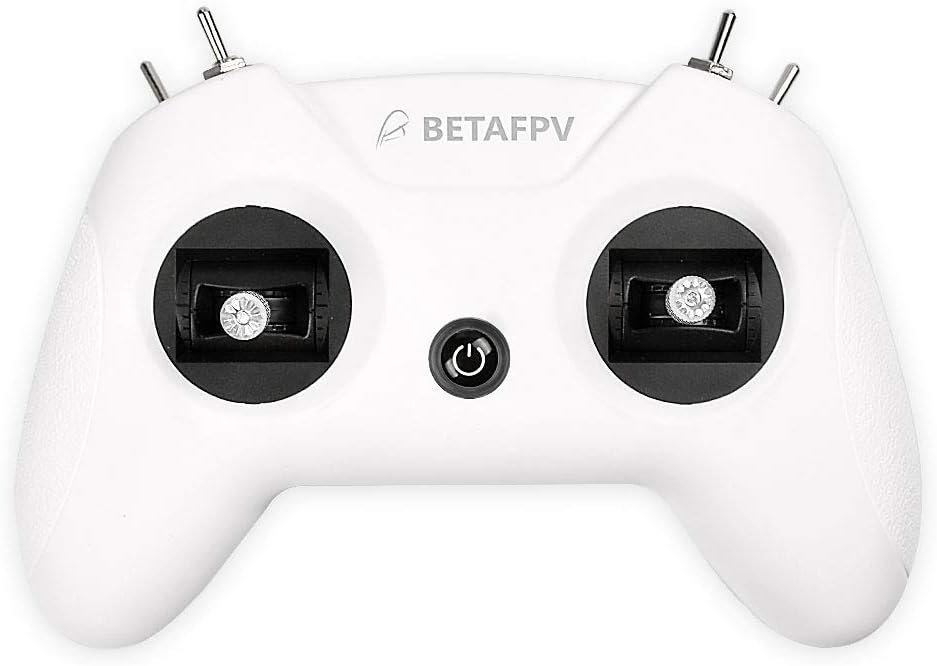
You get the transmitter, a USB-C cable and a user manual. The radio is white plastic and shaped like a game controller, with two potentiometer gimbals, a few aux switches along the top for channels 5 to 8 and a status LED instead of a screen. Amazon lists it at about 7 oz, so it is light enough to throw into a backpack with a whoop and a pair of goggles. The 1000 mAh 1S battery is built in and charges over USB-C. BETAFPV quotes up to eight hours of use, and the LED turns red, then flashes blue, when the cell drops below 3.5 V. There is no external battery option, no screen and no module bay, which keeps it simple but limits how far it can grow with you.
Compatibility: protocols, firmware and simulators
Out of the box the radio runs FrSky D16 FCC. You can switch to D16 LBT, D8 or Futaba S-FHSS on the radio itself using the button sequence in the manual. The fine print is important: the D16 modes only bind to receivers running ACCST 1.x firmware, so FrSky receivers updated to ACCST 2.x or ACCESS will not work, and neither will anything on ExpressLRS, TBS Crossfire or Spektrum. BETAFPV sells the same shell as a separate ExpressLRS 2.4 GHz version, and the details table on this Amazon listing confusingly quotes ELRS figures, so go by the listing title, which says FrSky D8, and the feature bullets, which describe the FrSky radio.
Firmware updates and stick calibration happen on the radio, and since December 2024 BETAFPV’s open-source Configurator V2 for Windows, macOS and Linux can handle settings from a computer. Plugged in by USB, the radio shows up as a joystick in Liftoff, VelociDrone, TRYP and DRL, and an Xbox mode makes it work with the DJI Flight Simulator on Windows. BETAFPV also lists Android phone and tablet support, which helps if you practice on mobile sims.
How it flies and what owners report
On paper, 100 mW on 2.4 GHz is plenty for whoops in a living room, a backyard or a small park, which is what this radio is for. The gimbals are potentiometer units, not Hall sensors. Reviews of the LiteRadio 2 family describe them as smooth for a budget radio but not in the same class as full-size transmitters, and some SE owners report dead zones that BETAFPV resolved with replacement gimbals. The listing holds 4.0 stars from about 240 ratings at the time of writing, lower than most radios we cover, and the listing’s own prominent warning about ACCST 2.0 receivers tells you where buyers most often get stuck. That is a protocol problem rather than a hardware fault, but it is the problem most new buyers will hit.
Value for money
Amazon lists it at $42.99 at the time of writing, while BETAFPV sells it direct for about $25. At the Amazon price it costs nearly as much as the ELRS LiteRadio 3, which is the better radio for most people. The 2 SE makes financial sense if it saves you rebuilding a FrSky fleet, or if you find it close to its direct price as a dedicated sim controller.
Alternatives
- BETAFPV LiteRadio 3: pick it if you are starting fresh; it has internal ELRS, a 2000 mAh battery and a nano bay for external modules.
- BETAFPV LiteRadio 3 Pro: pick it if you want Hall gimbals, a small screen and EdgeTX in a compact radio.
- RadioMaster Pocket: pick it if you want a compact ELRS radio running EdgeTX that will stay useful long after your first whoop.
The bottom line
The LiteRadio 2 SE is a tidy little radio that the hobby has largely moved past. Buy it to fly an existing FrSky D8 or ACCST 1.x quad, or as a cheap sim controller; otherwise spend a little more on an ExpressLRS radio that will bind to the quads on sale today.
.gap-review{margin:2.5rem 0 0}.gap-review h2{font-size:1.5rem;margin:0 0 1.25rem}.gap-verdict{background:#0E1A2B;color:#fff;border-radius:16px;padding:1.5rem 1.75rem}.gap-verdict__head{display:flex;gap:1.25rem;align-items:center}.gap-score{margin:0;width:84px;height:84px;border-radius:50%;background:#FF5A1F;color:#fff;display:flex;flex-direction:column;align-items:center;justify-content:center;font-weight:800;font-size:1.9rem;line-height:1}.gap-score small{font-size:.7rem;font-weight:600;opacity:.85}.gap-eyebrow{margin:0 0 .35rem;text-transform:uppercase;letter-spacing:.08em;font-size:.75rem;font-weight:700;color:#FF5A1F}.gap-verdict__line{margin:0;font-size:1.125rem;line-height:1.45}.gap-proscons{display:grid;grid-template-columns:1fr 1fr;gap:1.25rem 2rem;margin-top:1.5rem;padding-top:1.25rem;border-top:1px solid rgba(255,255,255,.15)}.gap-proscons h3{margin:0 0 .6rem;font-size:.9rem;text-transform:uppercase;letter-spacing:.05em;color:inherit}.gap-proscons ul{list-style:none;margin:0;padding:0}.gap-proscons li{position:relative;padding-left:1.6em;margin:0 0 .45em}.gap-proscons li::before{position:absolute;left:0;top:0;font-weight:800}.gap-pros li::before{content:’+’;color:#4ADE80}.gap-cons li::before{content:’2013′;color:#F87171}.gap-specs,.gap-faq{margin-top:2rem}.gap-specs h3,.gap-faq h3{font-size:1.2rem;margin:0 0 .75rem}.gap-specs table{width:100%;border-collapse:collapse;font-size:.95rem}.gap-specs th,.gap-specs td{text-align:left;padding:.65rem .9rem;border-bottom:1px solid #E2E8F0;vertical-align:top}.gap-specs th{width:38%;background:#F4F6F9}.gap-faq details{border:1px solid #E2E8F0;border-radius:10px;padding:0 1rem;margin:0 0 .6rem}.gap-faq summary{cursor:pointer;padding:.85rem 0;font-weight:600}.gap-cta{margin-top:2rem;padding:1.25rem 1.5rem;background:#F4F6F9;border-radius:16px;display:flex;flex-wrap:wrap;gap:.75rem;align-items:center}.gap-btn{display:inline-block;padding:.85em 1.5em;border-radius:10px;font-weight:600;text-decoration:none!important;background:#FF5A1F;color:#fff!important}.gap-btn–secondary{background:transparent;color:#0E1A2B!important;border:2px solid #E2E8F0}.gap-disclosure,.gap-note{font-size:.875rem;color:#4A5568;margin:.75rem 0 0}@media(max-width:640px){.gap-proscons{grid-template-columns:1fr}}
BETAFPV LiteRadio 2 SE review
6.8/10
madagear.com verdict
Buy it if you fly older FrSky D8 or ACCST 1.x whoops or want a cheap sim controller; skip it if you are starting fresh, because new BNF quads use ExpressLRS.
What we like
- Binds to FrSky D8, FrSky D16 (ACCST 1.x) and Futaba S-FHSS receivers
- Built-in 1000 mAh battery with USB-C charging, rated for up to 8 hours
- Works as a USB joystick in Liftoff, VelociDrone and other simulators
- Xbox mode makes it usable with the DJI Flight Simulator on Windows
- Light, gamepad-sized and simple to carry with a whoop kit
What we don’t
- No ExpressLRS in this version, so most current BNF quads will not bind
- Will not bind FrSky receivers on ACCST 2.x or ACCESS firmware
- Potentiometer gimbals, no screen and no external module bay
- Amazon price is well above BETAFPV’s direct price
Specs at a glance
| Protocols | FrSky D16 FCC (default, ACCST 1.x), FrSky D16 LBT, FrSky D8, Futaba S-FHSS |
|---|---|
| Frequency | 2.4 GHz (CC2500) |
| Output power | Up to 100 mW |
| Channels | 8 |
| Gimbals | Potentiometer |
| Battery | Built-in 1000 mAh 1S, up to 8 hours claimed |
| Charging | USB-C, low-battery LED warning below 3.5 V |
| Simulator support | USB joystick on PC and Android; Xbox mode for DJI Flight Simulator on Windows |
| Stick mode | Mode 2 |
| Weight | About 7 oz (Amazon listing) |
Frequently asked questions
Does the LiteRadio 2 SE work with ExpressLRS receivers?
Not this version. The listing is the FrSky (CC2500) radio, which speaks FrSky D8, FrSky D16 and Futaba S-FHSS. BETAFPV sells a separate ELRS 2.4 GHz version of the LiteRadio 2 SE, and the LiteRadio 3 also ships with ELRS.
Will it bind to my FrSky receiver?
It binds to D8 receivers and to D16 receivers running ACCST 1.x firmware, such as XM+ units on older firmware. Receivers updated to ACCST 2.x or ACCESS will not bind.
Can I use it with FPV simulators?
Yes. Over USB it appears as a joystick in Liftoff, VelociDrone, TRYP, DRL and similar simulators, and an Xbox mode lets it work with the DJI Flight Simulator on Windows. BETAFPV also lists Android phone and tablet support.
How do I change the protocol?
The protocol is switched on the radio itself with a button sequence described in the manual and the listing photos. The default is FrSky D16 FCC; D16 LBT, D8 and S-FHSS are the other options.
Amazon price for the FrSky (CC2500) Mode 2 version; BETAFPV sells it direct for about $25, and the ExpressLRS version is a separate listing. Price and availability checked on 2026-11-10.
madagear.com is reader-supported. When you buy through links on our site we may earn an affiliate commission, at no extra cost to you. This never affects what we recommend.



Reviews
There are no reviews yet.