



Description
Who it’s for
This is the entry point to streaming hardware. If you have a console, a camera or a second PC and you want its picture to show up in OBS, a USB capture dongle is the cheapest route, and the VIXLW sits squarely in that bracket at under thirty dollars at the time of writing. It is aimed at the person recording Switch or PS5 gameplay for YouTube, the sim racer who wants a cockpit camera feed, or the person who needs a DSLR to behave like a webcam on a Zoom call.
It is not for anyone chasing a 4K master file. The HDMI input handles 4K60 and the loop-out passes that resolution to your display untouched, but what reaches your computer is 1080p60 or 2K at 30fps. For most uploads that is fine, since YouTube and Twitch both deliver 1080p60 to the overwhelming majority of viewers, but if your workflow involves downscaling 4K footage in an editor this card cannot feed it.
It is also not for anyone who needs console voice chat in the recording. The listing is upfront that party chat is not captured, which is a hardware-level limitation of how consoles route that audio rather than a flaw specific to this product. Knowing that before you order avoids the single most common complaint aimed at cheap capture dongles.
Design and build
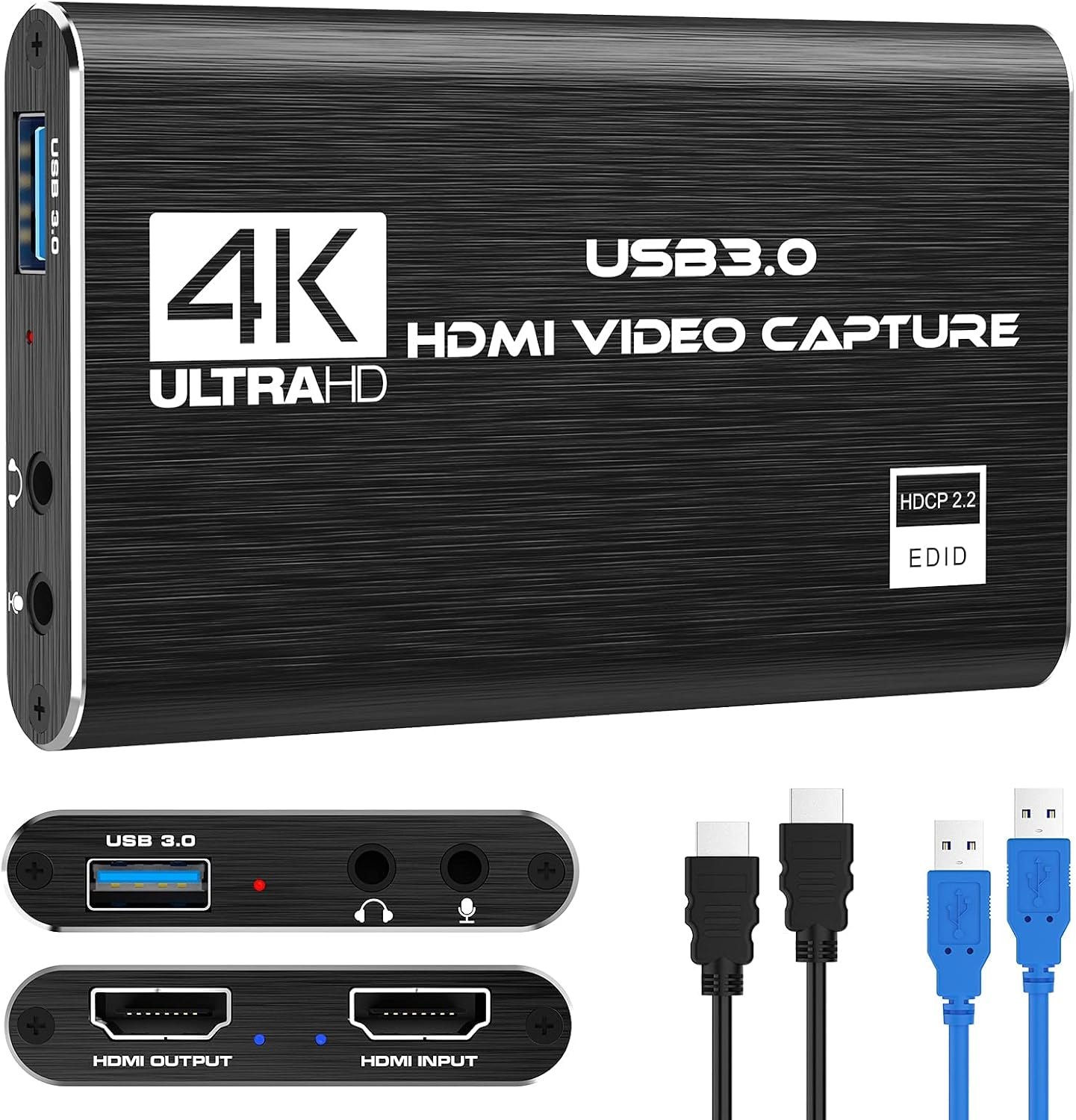
The card is a palm-sized slab weighing 0.18 kg with dimensions of roughly 3 x 2 x 1 inches, which puts it in the chunkier end of the dongle category rather than the thumb-drive shape you see at the very bottom of the market. The listing specifies an aluminum alloy body, and that matters more than it sounds: these chips run warm, and heat is the usual culprit behind the dropouts and color shifts that plague the cheapest plastic units. On paper, a metal shell acting as a heatsink is the right design call.
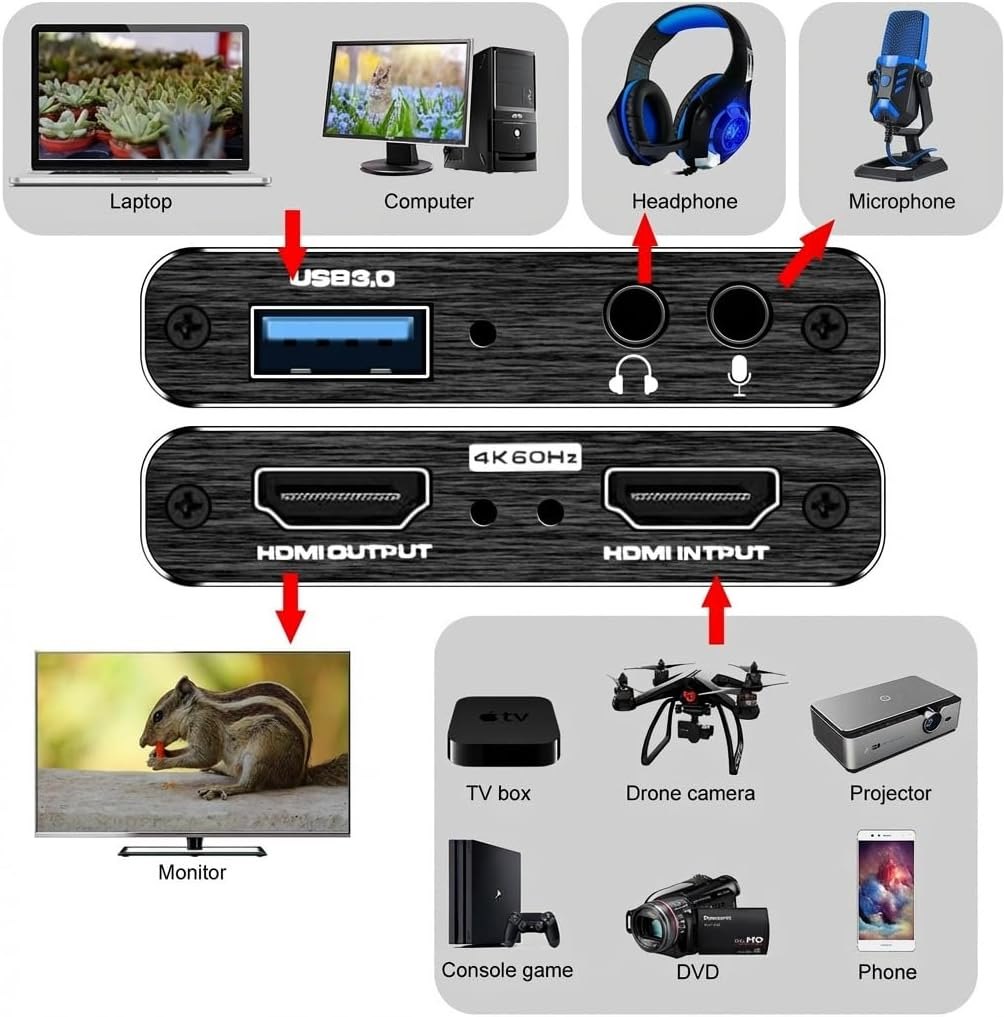
Connectivity is straightforward. HDMI in, HDMI loop-out, USB 3.0 to the host, and a 3.5mm microphone jack. There is no external power input, which keeps the cable count down but means the USB port is carrying both data and power. The box includes a USB-A cable and a USB-A to USB-C adapter, so a modern laptop with only Type-C ports is covered without an extra purchase. There is no HDMI cable in the box, so budget for one if you do not have a spare.
The mic jack is worth a note. It accepts a 3.5mm microphone headset and mixes commentary into the capture stream, which is genuinely useful if you are recording on a laptop without a separate audio interface. It is a convenience feature rather than a quality one, and anyone serious about voice will still want a USB microphone handled by OBS directly.
What the specs tell us
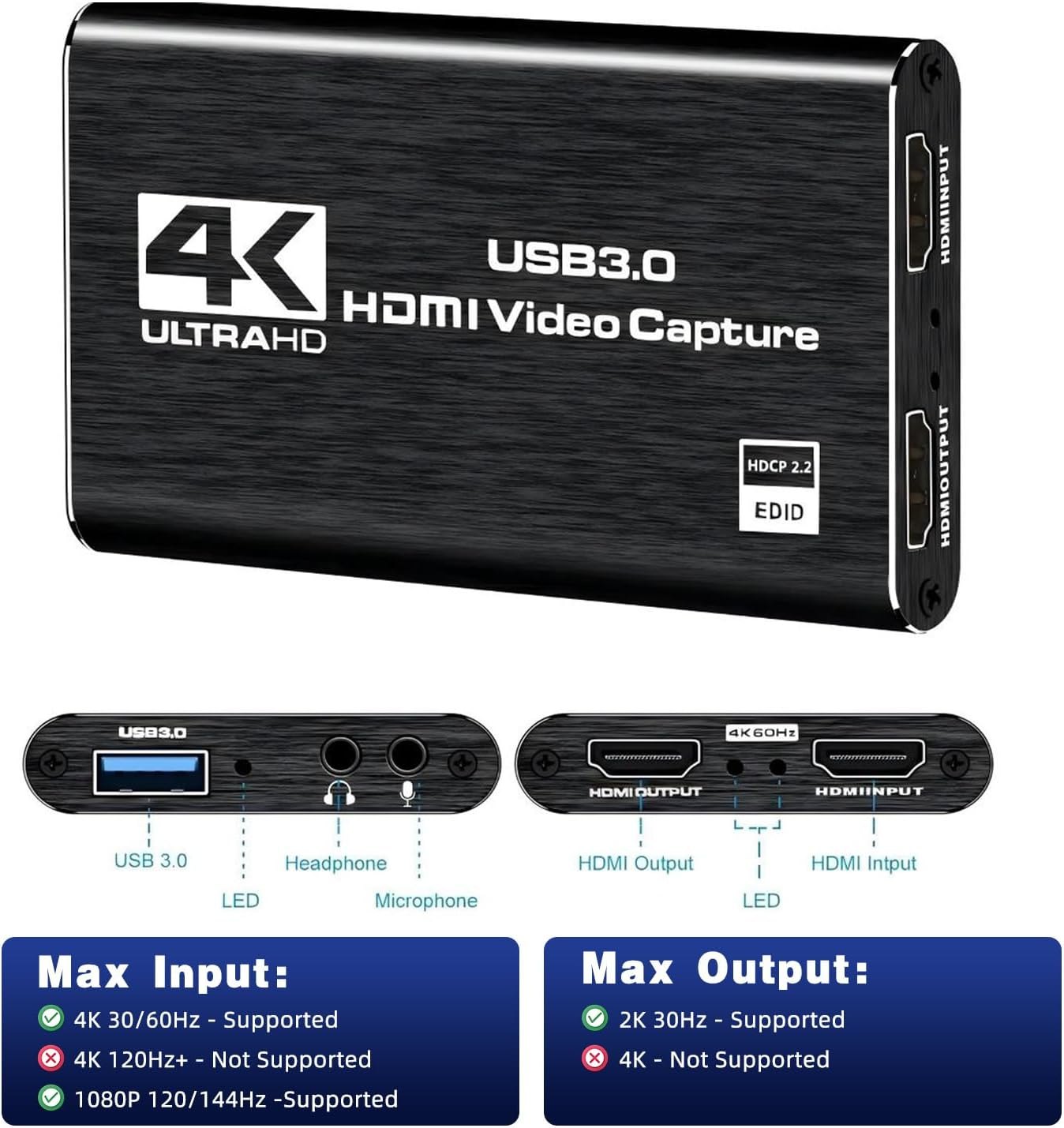
The capture ceiling is 1080p60 or 2K30 in YUY2 over USB 3.0, with MJPEG also listed. YUY2 is uncompressed, which is what you want for latency and image quality, and it is also what eats the USB 3.0 bandwidth. That is why the minimum requirements explicitly call for a USB 3.0 port; on USB 2.0 you would be pushed into MJPEG with visible compression artifacts. Owners of similar cards consistently find that choosing the wrong pixel format in OBS is the root of most “it looks soft” complaints.
Input flexibility is broad. The listing claims 4K30 and 4K60 input plus 1080p120 and 1080p144, while explicitly ruling out 4K120 and 4K144. That 1080p144 input figure is the useful one for PC players, since it means a high-refresh gaming rig can keep its native refresh on the loop-out display while the card samples down to 60fps for recording.
Software support is the generic UVC story: no drivers, recognized automatically, and compatible with OBS Studio, Streamlabs, XSplit, Potplayer, VLC and Zoom across Windows 7 through 10, macOS, Linux and Android. The one quirk the manufacturer flags is needing to restart OBS after configuring audio, which is a known behavior with class-compliant audio devices rather than a defect.
Living with it
Buyers rate it 4.3 out of 5 across more than 3,700 ratings, which for a no-name capture dongle is a reasonable showing. That kind of distribution usually means the hardware works as described for most people, with a tail of returns from mismatched expectations around 4K recording and party chat, plus the usual handful of units that fail early.
In day-to-day use the loop-out is the feature that earns its keep. Playing through the card’s HDMI output at full 4K60 means you are not staring at a laggy preview window, which is the single biggest annoyance with passthrough-free capture devices. Latency on the USB side is low enough for recording and streaming but, as with every capture card in this class, not low enough to play through.
One limitation the listing does not mention is HDCP. Copy protection on Blu-ray players and some streaming boxes will block capture entirely, and consoles need their HDCP setting disabled in system menus before game footage appears. That is universal across consumer capture hardware, not a defect here, but it catches first-time buyers out regularly.
Value for money
At $26.89 at the time of writing, the question is not whether this is the best capture card but whether it does the job for a fraction of the price of a branded one. A 1080p60 Elgato costs several times as much, and the gap buys you software integration, firmware updates and a support line rather than raw capture capability. If you are testing whether streaming is something you want to keep doing, spending under thirty dollars to find out is sensible.
The risk is longevity and support. An unfamiliar brand means no track record for firmware fixes and no certainty the seller will be around in two years. The listing promises 24-hour customer service for quality problems, which is a common claim at this end of the market and worth exactly as much as the platform’s return policy backing it.
Prices in this category move constantly with coupons and seasonal promotions, so the figure you see may differ. The included USB-C adapter is a small but real saving for laptop users who would otherwise buy one separately.
Alternatives
The Elgato HD60 X is the obvious step up: it captures 1080p60 with 4K60 HDR10 passthrough, has mature software and firmware support, and is the right pick if streaming is something you do regularly rather than occasionally.
The AVerMedia Live Gamer Mini covers similar ground to the VIXLW at a middle price, and is worth the premium if you want a known brand’s build quality and warranty without paying Elgato money.
An internal PCIe card such as the Elgato 4K X makes sense only if you have a desktop with a spare slot and genuinely need 4K recording rather than 4K passthrough, which is a different and considerably more expensive problem to solve.
The bottom line
The VIXLW does the one thing a budget capture card has to do, which is turn an HDMI source into a 1080p60 OBS input without drivers, fuss or a second display. Go in knowing the 4K figure applies to passthrough rather than recording, and that console party chat stays out of the mix, and the price is hard to argue with. Treat it as a low-cost way to find out whether you want better gear later.
.gap-review{margin:2.5rem 0 0}.gap-review h2{font-size:1.5rem;margin:0 0 1.25rem}.gap-verdict{background:#0E1A2B;color:#fff;border-radius:16px;padding:1.5rem 1.75rem}.gap-verdict__head{display:flex;gap:1.25rem;align-items:center}.gap-score{margin:0;width:84px;height:84px;border-radius:50%;background:#FF5A1F;color:#fff;display:flex;flex-direction:column;align-items:center;justify-content:center;font-weight:800;font-size:1.9rem;line-height:1}.gap-score small{font-size:.7rem;font-weight:600;opacity:.85}.gap-eyebrow{margin:0 0 .35rem;text-transform:uppercase;letter-spacing:.08em;font-size:.75rem;font-weight:700;color:#FF5A1F}.gap-verdict__line{margin:0;font-size:1.125rem;line-height:1.45}.gap-proscons{display:grid;grid-template-columns:1fr 1fr;gap:1.25rem 2rem;margin-top:1.5rem;padding-top:1.25rem;border-top:1px solid rgba(255,255,255,.15)}.gap-proscons h3{margin:0 0 .6rem;font-size:.9rem;text-transform:uppercase;letter-spacing:.05em;color:inherit}.gap-proscons ul{list-style:none;margin:0;padding:0}.gap-proscons li{position:relative;padding-left:1.6em;margin:0 0 .45em}.gap-proscons li::before{position:absolute;left:0;top:0;font-weight:800}.gap-pros li::before{content:’+’;color:#4ADE80}.gap-cons li::before{content:’2013′;color:#F87171}.gap-specs,.gap-faq{margin-top:2rem}.gap-specs h3,.gap-faq h3{font-size:1.2rem;margin:0 0 .75rem}.gap-specs table{width:100%;border-collapse:collapse;font-size:.95rem}.gap-specs th,.gap-specs td{text-align:left;padding:.65rem .9rem;border-bottom:1px solid #E2E8F0;vertical-align:top}.gap-specs th{width:38%;background:#F4F6F9}.gap-faq details{border:1px solid #E2E8F0;border-radius:10px;padding:0 1rem;margin:0 0 .6rem}.gap-faq summary{cursor:pointer;padding:.85rem 0;font-weight:600}.gap-cta{margin-top:2rem;padding:1.25rem 1.5rem;background:#F4F6F9;border-radius:16px;display:flex;flex-wrap:wrap;gap:.75rem;align-items:center}.gap-btn{display:inline-block;padding:.85em 1.5em;border-radius:10px;font-weight:600;text-decoration:none!important;background:#FF5A1F;color:#fff!important}.gap-btn–secondary{background:transparent;color:#0E1A2B!important;border:2px solid #E2E8F0}.gap-disclosure,.gap-note{font-size:.875rem;color:#4A5568;margin:.75rem 0 0}@media(max-width:640px){.gap-proscons{grid-template-columns:1fr}}
VIXLW 4K HDMI Capture Card review
7.1/10
madagear.com verdict
Buy it if you want a cheap, driver-free way to get a console or camera into OBS at 1080p60; skip it if you need 4K recording, party-chat audio, or a brand with long-term firmware support.
What we like
- 1080p60 capture over USB 3.0 with no drivers or external power needed
- 4K60 HDMI loop-out so you can game on a full-resolution display while recording
- Aluminum shell helps shed heat better than the common plastic dongles
- 3.5mm mic input lets you mix commentary without a separate audio interface
- Works with OBS, Streamlabs, XSplit, VLC, Potplayer and Zoom as a UVC device
- Ships with a USB-C adapter, so modern laptops do not need a separate dongle
What we don’t
- Captures 1080p60 or 2K30 only, so no 4K recording despite the 4K input
- Does not pass console party chat, a common disappointment for Xbox and PS users
- No HDMI cable included, and HDCP-protected sources will not capture
- Unfamiliar brand with limited track record for firmware or long-term support
Specs at a glance
| Brand | VIXLW |
|---|---|
| Max input resolution | 4K at 60Hz (also 1080p120/144) |
| Capture resolution | 1080p60 or 2K30 |
| Output formats | YUY2 / MJPEG |
| Interface | USB 3.0 Type-A (Type-C adapter included) |
| Passthrough | HDMI loop-out up to 4K60 |
| Audio | 3.5mm microphone input |
| Compatibility | Windows 7/8/10, macOS, Linux, Android |
| In the box | Card, USB 3.0 cable, USB-A to USB-C adapter, manual |
| Weight | 0.18 kg (3 x 2 x 1 in) |
Frequently asked questions
Can it record in 4K?
No. The HDMI input accepts up to 4K60 and the loop-out passes that straight through to your monitor or TV, but the USB 3.0 capture path tops out at 1080p60 or 2K30. If you need a 4K master file, you need a different class of device entirely.
Will it capture my Xbox or PlayStation party chat?
No, and the listing says so plainly. Console party chat is routed separately from the HDMI audio, so you only get game audio plus whatever you feed into the 3.5mm mic jack. Capturing chat requires a mixer or a headset adapter that splits the chat feed.
Does it work with a Mac or a Linux machine?
It is listed as a plug-and-play UVC device for Windows, macOS, Linux and Android, so it should appear as a generic video source without drivers. In OBS that means adding it as a Video Capture Device and selecting YUY2 for the lowest latency. Owners generally report the restart-OBS step in the manual is needed to get audio flowing.
Is USB 3.0 required, or will USB 2.0 work?
Plug it into a USB 3.0 port. USB 2.0 does not have the bandwidth for uncompressed 1080p60, so you would be forced into MJPEG at lower frame rates or lower resolution. The listed minimum requirements call out a USB 3.0 port specifically.
At the time of writing it lists at $26.89, which covers the card, a USB-A cable, a USB-A to USB-C adapter and a manual but no HDMI cable; dongles in this class drift a few dollars either way with coupons and seasonal sales. Price and availability checked on 2026-11-14.
madagear.com is reader-supported. When you buy through links on our site we may earn an affiliate commission, at no extra cost to you. This never affects what we recommend.



Reviews
There are no reviews yet.