

Description
Who it’s for
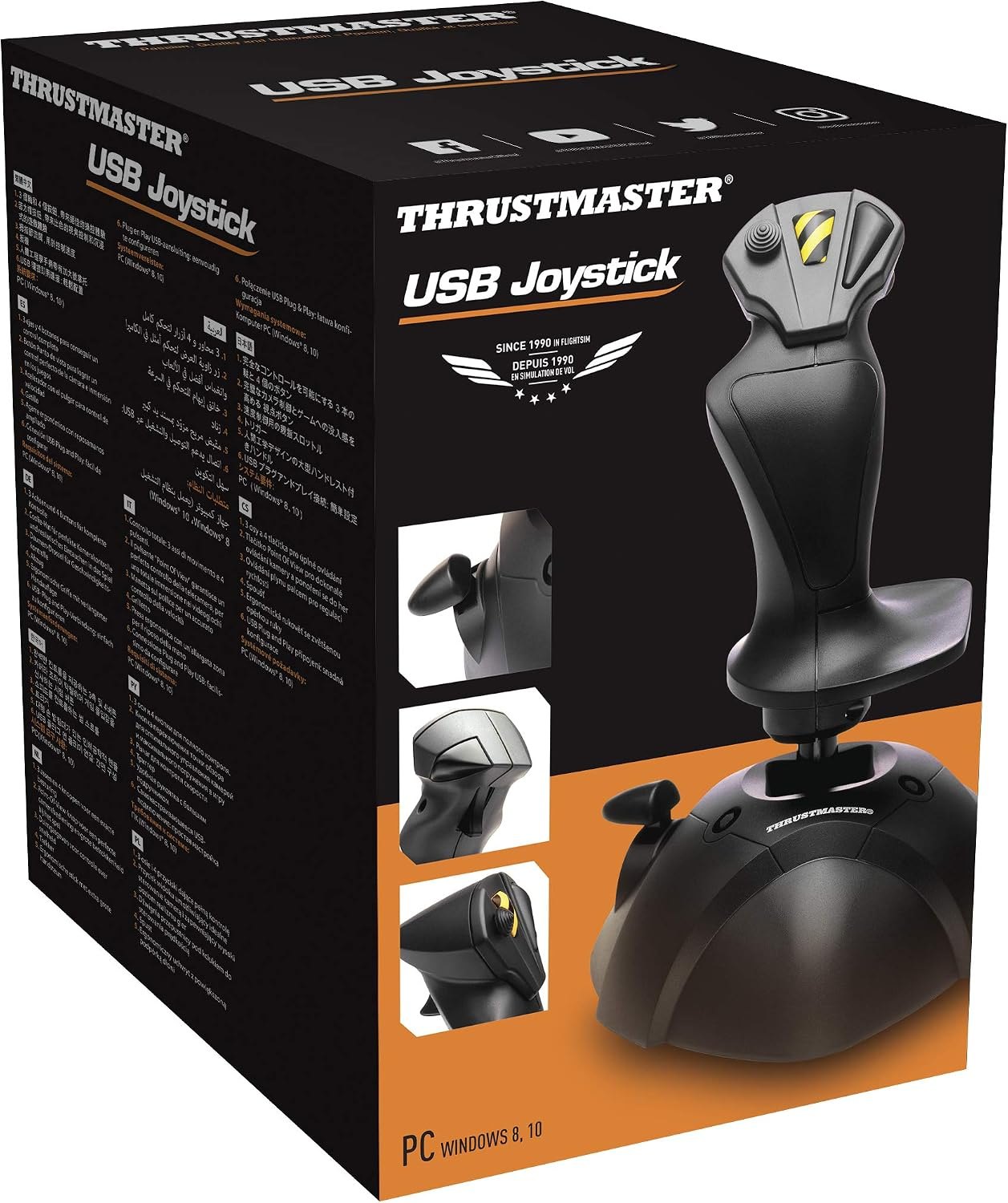
This is the stick you buy when you have been flying with a gamepad or keyboard, you have decided you want a proper hand on the control column, and you are not yet willing to spend three figures finding out whether the hobby sticks. Thrustmaster positions it as entry-level and the specification backs that up: three axes, four buttons, one trigger, a point-of-view hat, and a USB cable. Nothing else.
That audience is larger than enthusiast forums suggest. Plenty of people pick up a flight sim after watching someone else fly, want to try a circuit around their home airport, and have no intention of building a cockpit. For them, the question is not whether this is a good joystick in absolute terms, but whether it is enough joystick to make the sim feel different from a controller. On paper it is, because the two things a gamepad cannot give you are a centered self-returning column and a hat switch for looking around the cockpit, and this has both.
It is also a reasonable choice for a second stick: something to keep in a drawer for a visiting friend, or to hand to a child who wants to try the family copy of a flight sim without touching your expensive gear. If you already own a HOTAS, nothing here will interest you.
Design and build
The published dimensions, 9.45 by 6.5 by 6.5 inches, describe a compact desktop stick with a small square footprint rather than the sprawling base of a mid-range unit. At 14.4 ounces it is light, which is the honest trade-off in this class: a stick this weight will not stay planted on a smooth desk through aggressive inputs unless you hold the base or it has grip on the underside. Owners of budget sticks generally learn to anchor the base with the off hand.
Thrustmaster describes the handle as ergonomic with an enlarged rest, which in practice means a palm shelf so the heel of your hand carries some weight rather than gripping the column the whole session. That matters more than it sounds on long flights, where fatigue comes from holding rather than moving. The finish is listed simply as black, and the included components as the joystick alone, so there are no clamps, weights or extra plates in the box.
The connection is a plain corded USB line with no battery and no wireless dongle, which removes a whole category of problems. Windows handles generic USB game controllers natively, so setup is usually a matter of plugging in and binding axes inside the sim. A one-year warranty is listed, which is standard rather than generous.
What the specs tell us
Three axes is the number to focus on. On a stick with this layout that normally means pitch, roll and a twist for yaw, and the twist axis is what lets you fly without rudder pedals. It is the single spec that separates a usable beginner flight sim stick from a toy. Without it, every crosswind landing and every coordinated turn becomes a keyboard reach.
Four buttons plus a trigger is the ceiling, and it is a low one. A general aviation light aircraft needs gear, flaps, brakes, trim and perhaps an autopilot toggle, and you are already past the budget before you consider lights or radios. The POV hat buys back some of that, because without a hat you would burn buttons on view control, which is the single most frequent input in any cockpit sim.
What is absent tells its own story. There is no throttle lever in the included components, no force feedback mentioned, and no stated resolution or sensor type for the axes. Buyers report an average of 3.9 stars across roughly 2,332 ratings, which for a product this cheap usually points to variation between units and axis wear over time rather than a design that fails outright.
Living with it
The daily reality of a stick like this is remapping. Because the button budget is tight, you end up deciding which four controls genuinely need to be under your thumb and pushing everything else to the keyboard. That is not a disaster, but it means your left hand never really leaves the keys, which is the opposite of what a HOTAS setup buys you.
Storage is easy. A 14.4-ounce stick with a six-and-a-half-inch base goes in a drawer or on a shelf between sessions, so it suits people who share a desk with work. The cable is the only clutter. Because there is no profile software requirement implied by the listing, there is also nothing to keep updated, which is one less thing to break after a Windows update.
The thing to watch over a year or two is the twist axis and the centering spring. On low-cost sticks these are the first parts to develop slop, and the symptom is a stick that no longer sits dead center when you let go. The one-year warranty covers the period in which a bad unit normally declares itself.
Alternatives
The Logitech Extreme 3D Pro is the direct rival at similar money, with a twist rudder, a throttle slider on the base and considerably more buttons, so pick it if button count is your limiting factor and you can live with its larger footprint.
The Thrustmaster T.16000M is the obvious step up within the same family, adding hall-effect sensors for smoother, longer-lasting axes and a far larger button layout, and it is the one to buy if you already know you will keep flying past the first month.
If you would rather not spend at all yet, a standard gamepad with a decent sim’s assisted control settings gets you flying tonight for nothing, and is worth trying first if you are unsure whether you enjoy the genre.
The bottom line
This stick solves one problem well: it turns a keyboard flyer into a stick flyer for the price of a couple of games, and the POV hat means you can actually look around the cockpit while you do it. What it cannot do is grow with you, because four buttons and no throttle is a hard ceiling rather than a soft one. Treat it as a deliberate trial run rather than a purchase you expect to keep.
.gap-review{margin:2.5rem 0 0}.gap-review h2{font-size:1.5rem;margin:0 0 1.25rem}.gap-verdict{background:#0E1A2B;color:#fff;border-radius:16px;padding:1.5rem 1.75rem}.gap-verdict__head{display:flex;gap:1.25rem;align-items:center}.gap-score{margin:0;width:84px;height:84px;border-radius:50%;background:#FF5A1F;color:#fff;display:flex;flex-direction:column;align-items:center;justify-content:center;font-weight:800;font-size:1.9rem;line-height:1}.gap-score small{font-size:.7rem;font-weight:600;opacity:.85}.gap-eyebrow{margin:0 0 .35rem;text-transform:uppercase;letter-spacing:.08em;font-size:.75rem;font-weight:700;color:#FF5A1F}.gap-verdict__line{margin:0;font-size:1.125rem;line-height:1.45}.gap-proscons{display:grid;grid-template-columns:1fr 1fr;gap:1.25rem 2rem;margin-top:1.5rem;padding-top:1.25rem;border-top:1px solid rgba(255,255,255,.15)}.gap-proscons h3{margin:0 0 .6rem;font-size:.9rem;text-transform:uppercase;letter-spacing:.05em;color:inherit}.gap-proscons ul{list-style:none;margin:0;padding:0}.gap-proscons li{position:relative;padding-left:1.6em;margin:0 0 .45em}.gap-proscons li::before{position:absolute;left:0;top:0;font-weight:800}.gap-pros li::before{content:’+’;color:#4ADE80}.gap-cons li::before{content:’2013′;color:#F87171}.gap-specs,.gap-faq{margin-top:2rem}.gap-specs h3,.gap-faq h3{font-size:1.2rem;margin:0 0 .75rem}.gap-specs table{width:100%;border-collapse:collapse;font-size:.95rem}.gap-specs th,.gap-specs td{text-align:left;padding:.65rem .9rem;border-bottom:1px solid #E2E8F0;vertical-align:top}.gap-specs th{width:38%;background:#F4F6F9}.gap-faq details{border:1px solid #E2E8F0;border-radius:10px;padding:0 1rem;margin:0 0 .6rem}.gap-faq summary{cursor:pointer;padding:.85rem 0;font-weight:600}.gap-cta{margin-top:2rem;padding:1.25rem 1.5rem;background:#F4F6F9;border-radius:16px;display:flex;flex-wrap:wrap;gap:.75rem;align-items:center}.gap-btn{display:inline-block;padding:.85em 1.5em;border-radius:10px;font-weight:600;text-decoration:none!important;background:#FF5A1F;color:#fff!important}.gap-btn–secondary{background:transparent;color:#0E1A2B!important;border:2px solid #E2E8F0}.gap-disclosure,.gap-note{font-size:.875rem;color:#4A5568;margin:.75rem 0 0}@media(max-width:640px){.gap-proscons{grid-template-columns:1fr}}
Thrustmaster USB Joystick review
6.8/10
madagear.com verdict
Buy it if you want the cheapest honest entry into flight sim on PC; skip it if you already know you will log serious hours, because you will outgrow four buttons quickly.
What we like
- POV hat is rare at this price and makes cockpit scanning possible
- Three axes including twist rudder, so no pedals needed to start
- Plain USB connection with no battery or dongle to manage
- Light at 14.4 ounces, easy to stow between sessions
- One-year warranty from a established flight sim brand
- Low enough cost to try the hobby without committing
What we don’t
- Four buttons and one trigger run out fast in complex sims
- Windows only, with no stated Mac or console support
- No throttle lever included, so power goes on the keyboard
- 3.9 star buyer average suggests inconsistent unit quality
Specs at a glance
| Brand | Thrustmaster |
|---|---|
| Model | USB Joystick |
| Controller type | Joystick |
| Axes | 3 |
| Buttons | 4 plus 1 trigger |
| Hat switch | Point-of-view button |
| Connection | USB, corded |
| Platform | Windows PC |
| Weight | 14.4 ounces |
| Dimensions | 9.45 x 6.5 x 6.5 inches |
| Warranty | One year |
Frequently asked questions
Does it have rudder control without pedals?
The listing specifies three axes, which on a stick of this layout means pitch, roll and a twist axis for yaw. That twist axis stands in for rudder pedals, so you can fly coordinated turns and handle crosswind landings without buying anything else. It is less precise than real pedals, but it is enough to learn on.
Will four buttons be enough for flight sim?
For arcade-leaning flight games and basic general aviation flying, four buttons plus a trigger and the POV hat covers the essentials like gear, flaps, brakes and view control. For study-level airliners or combat sims with weapons management, it will not be, and you will lean heavily on the keyboard. Most sims let you remap freely, so the limit is memory rather than software.
Does it work on Mac or console?
The facts list Windows as the compatible platform and pc as the hardware platform, with no mention of macOS, PlayStation or Xbox. Treat it as a Windows-only device. If you fly on a console or a Mac, look at a stick that states that support explicitly.
Is it a HOTAS?
No. The included components are listed as the joystick only, so there is no separate throttle unit. Throttle control happens on the stick’s own axis assignment or on the keyboard, which is the main structural difference between this and a two-piece HOTAS set.
At the time of writing it sits at $57.74, which covers the stick alone with a one-year warranty and no throttle or pedals, and street pricing on entry-level sticks like this tends to drift down during sales and back up when stock thins. Price and availability checked on 2026-11-14.
madagear.com is reader-supported. When you buy through links on our site we may earn an affiliate commission, at no extra cost to you. This never affects what we recommend.



Reviews
There are no reviews yet.