Drone Features Explained: Essential Terminology for Buyers
Navigating the drone market can be overwhelming, with manufacturers touting a myriad of technical specifications and acronyms. To confidently select the right drone, it's crucial to understand what these drone features explained mean for performance, usability, and your specific application. This comprehensive guide breaks down the essential terminology, empowering you to make an informed purchasing decision.
Understanding Basic Drone Anatomy
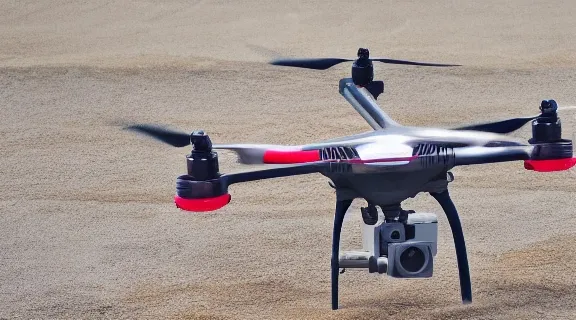
Before delving into complex features, a foundational understanding of a drone's core components is essential. Every drone, from a miniature toy to a professional cinematic platform, shares fundamental parts that enable flight and functionality.
The Airframe and Propellers
The airframe is the drone's structural body, housing all internal components. It dictates the drone's size, weight, and often its durability. Materials range from lightweight plastics for consumer models to carbon fiber and aerospace-grade composites for high-performance or industrial drones. Propellers, typically made from plastic or carbon fiber, generate thrust. The number of propellers (quadcopters, hexacopters, octocopters) directly impacts lift capacity, stability, and redundancy.
Motors and Electronic Speed Controllers (ESCs)
Brushless motors are standard in most modern drones due to their efficiency and power. Each motor is controlled by an Electronic Speed Controller (ESC), which regulates the power supplied to the motor, dictating its speed and, consequently, the propeller's thrust. Coordinated ESCs allow for precise control over flight maneuvers.
The Flight Controller
Often considered the "brain" of the drone, the flight controller is a sophisticated computer board that interprets commands from the remote controller, processes data from onboard sensors (like accelerometers and gyroscopes), and sends signals to the ESCs to adjust motor speeds. It manages stability, executes flight modes, and ensures smooth operation.
Battery and Power System
The battery is the drone's power source, typically a Lithium Polymer (LiPo) battery, chosen for its high energy density. Battery capacity (measured in mAh) and voltage (e.g., 3S, 4S) directly correlate with flight time and power output. The power distribution board (PDB) efficiently routes power from the battery to all electronic components.
Navigational & Positioning Systems: GPS and Beyond
Accurate positioning and navigation are paramount for stable flight, intelligent features, and safe operation. Modern drones leverage a combination of technologies to achieve this precision.
GPS (Global Positioning System)
GPS is perhaps the most critical navigational feature for outdoor drones. It allows the drone to pinpoint its exact location in 3D space using signals from orbiting satellites. This enables:
- Altitude Hold: Maintains a specific height above the ground.
- Position Hold: Keeps the drone stationary in the air, even in windy conditions.
- Return-to-Home (RTH): Automatically guides the drone back to its takeoff point if signal is lost or battery is low.
- Waypoint Navigation: Allows pre-programming a flight path using a series of GPS coordinates.
GLONASS, Galileo, and Other GNSS
Many advanced drones now support multiple Global Navigation Satellite Systems (GNSS) beyond just GPS, such as Russia's GLONASS, Europe's Galileo, and China's BeiDou. Utilizing multiple systems increases the number of available satellites, leading to faster lock times, greater accuracy, and improved reliability, especially in areas with obstructed views of the sky.
Vision Positioning Systems (VPS) and Optical Flow
For indoor flight or environments where GPS signals are weak or unavailable, drones rely on Vision Positioning Systems (VPS) and optical flow sensors. These systems typically use downward-facing cameras and ultrasonic sensors to detect patterns and distances on the ground. By analyzing how these patterns shift, the drone can infer its position and movement relative to the ground, allowing for stable hovering and precise low-altitude flight without GPS.
Inertial Measurement Unit (IMU)
The IMU is a crucial internal sensor package consisting of accelerometers and gyroscopes.
- Accelerometers measure the drone's linear acceleration along its three axes (forward/backward, left/right, up/down).
- Gyroscopes measure the drone's angular velocity or rotation around its three axes (roll, pitch, yaw).
The flight controller uses IMU data to detect changes in the drone's orientation and movement, enabling it to make rapid adjustments to maintain stability. A magnetometer (compass) is often integrated into the IMU to provide heading information.
Camera and Imaging Capabilities: Gimbals and Sensors
For aerial photography and videography, the camera system is arguably the most important feature. Its quality hinges on several interconnected components.
Gimbals: Stabilizing Your Shot
A gimbal is a motorized mechanical stabilization system that holds the camera steady, compensating for the drone's movements (pitch, roll, and yaw).
- 2-Axis Gimbals: Stabilize along two axes, typically pitch (up/down tilt) and roll (side-to-side tilt). They effectively remove most shakiness but can still show horizontal yaw movements.
- 3-Axis Gimbals: The gold standard for professional aerial footage, stabilizing along all three axes: pitch, roll, and yaw. This results in incredibly smooth, cinematic footage, regardless of drone movement or wind.
Some entry-level drones may use electronic image stabilization (EIS) instead of a physical gimbal. While EIS can improve footage, it generally cannot match the smoothness and quality of a dedicated 3-axis gimbal.
Camera Sensor Size and Megapixels
- Sensor Size: A larger sensor (e.g., 1-inch CMOS) can capture more light and detail, resulting in better image quality, especially in low-light conditions, and a wider dynamic range. Smaller sensors (e.g., 1/2.3-inch) are common in consumer drones but offer less performance.
- Megapixels (MP): Indicates the resolution of still images. More megapixels allow for larger prints or more cropping flexibility, but sensor quality is often more critical than raw MP count.
Video Resolution and Frame Rates
Common video resolutions include:
- 1080p (Full HD): Standard quality, suitable for general use.
- 2.7K: Offers more detail than 1080p, good for everyday shooting.
- 4K (Ultra HD): Provides significantly more detail, ideal for professional-looking footage and future-proofing.
- 5.4K/6K/8K: Found on high-end professional drones, offering extreme detail for large screens or heavy post-production cropping.
Frame Rate (fps): Higher frame rates (e.g., 60fps, 120fps) allow for smoother motion and the ability to create slow-motion effects without sacrificing fluidity.
Aperture, ISO, and Shutter Speed
These photographic terms directly impact image quality:
- Aperture (f-stop): Controls the amount of light entering the lens. A lower f-number (e.g., f/2.8) means a wider aperture, allowing more light in and creating a shallower depth of field.
- ISO: Represents the camera's sensitivity to light. Higher ISO values allow for shooting in darker conditions but can introduce digital noise.
- Shutter Speed: Determines how long the sensor is exposed to light. Faster shutter speeds freeze motion, while slower speeds can create motion blur.
Many drones offer manual control over these settings, giving pilots greater creative freedom.
Flight Modes and Intelligent Features Explained
Modern drones come equipped with a variety of flight modes and intelligent features that simplify operation, enhance safety, and enable complex shots.
Basic Flight Modes
- GPS Mode (Position Mode): The most common mode for beginners, leveraging GPS and other sensors to maintain a stable hover, altitude, and position.
- ATTI Mode (Attitude Mode): When GPS signal is unavailable or turned off, the drone uses its IMU to maintain altitude but drifts horizontally. Requires more pilot input for positioning.
- Sport Mode: Disables some stability features to allow for faster flight speeds and more aggressive maneuvers. Not recommended for beginners.
Intelligent Flight Modes
These automated modes allow the drone to perform complex flight patterns with minimal pilot input:
- ActiveTrack/Follow Me: The drone autonomously follows a designated subject, keeping it in the frame.
- Waypoint Navigation: Pilot pre-programs a flight path using GPS points, and the drone flies it automatically.
- Point of Interest (POI)/Orbit: The drone circles a chosen subject at a specified radius and altitude, keeping it centered in the frame.
- TapFly: Pilot taps a point on the screen, and the drone flies to that location while avoiding obstacles.
- Cinematic Mode: Slows down flight and control inputs for smoother, more cinematic footage.
- Gesture Control: Allows the drone to take photos or videos based on specific hand gestures.
- Hyperlapse/Timelapse: Captures a series of photos over time and stitches them into a video, either sped up (timelapse) or with drone movement (hyperlapse).
Battery Life and Charging Considerations
Battery technology is a critical factor influencing a drone's practical usability.
Flight Time
The advertised flight time is often an optimistic estimate under ideal conditions (no wind, constant speed). Real-world flight times can be 10-20% shorter. Factors influencing flight time include:
- Battery Capacity (mAh): Higher mAh generally means longer flight time.
- Drone Weight: Heavier drones consume more power.
- Propeller Efficiency: Aerodynamic design of propellers.
- Wind Conditions: Flying against wind significantly drains the battery.
- Payload: Carrying accessories or heavier cameras reduces flight time.
Charging Time and Smart Batteries
- Charging Time: Can range from under an hour for smaller batteries to several hours for larger ones. Fast chargers can significantly reduce this.
- Smart Batteries: Many modern drone batteries include integrated electronics for intelligent charging, discharging, and balancing. They often feature LED indicators for charge level and built-in protection mechanisms against overcharging or over-discharging. Some can even self-discharge to a storage voltage for optimal battery health.
Transmission and Control Range
The link between your remote controller and the drone is vital for safe and reliable operation.
Radio Frequency (RF) Transmission
Drones typically communicate with their remote controller via radio frequencies, most commonly 2.4 GHz and 5.8 GHz.
- 2.4 GHz: Offers better range and penetration through obstacles but is more susceptible to interference from Wi-Fi and other devices.
- 5.8 GHz: Provides better signal quality in crowded urban areas with less interference but has a shorter effective range and less penetration through objects.
Many advanced drone systems use proprietary transmission technologies (e.g., DJI's OcuSync, Autel's LiveDeck) that optimize bandwidth, reduce latency, and dynamically switch between frequencies for enhanced reliability and extended range.
Maximum Transmission Range
This specification indicates the maximum theoretical distance the drone can fly from the controller while maintaining a stable connection. It's often measured in kilometers or miles. In practice, obstacles, interference, and regulatory restrictions (e.g., line of sight requirements) often limit the usable range. Always prioritize flying within your visual line of sight (VLOS) for safety.
Video Transmission Latency
Latency refers to the delay between what the drone's camera sees and when that image appears on your remote controller's screen or connected mobile device. Low latency (e.g., under 100ms) is crucial for smooth FPV (First Person View) flying and precise camera control, especially during cinematic maneuvers. High latency can make flying difficult and disorienting.
Safety Features and Regulations
Safety is paramount in drone operation. Many drone features explained directly contribute to preventing accidents and ensuring compliance.
Obstacle Avoidance Systems
These systems use sensors (vision sensors, infrared sensors, ultrasonic sensors) to detect objects in the drone's path.
- Forward/Backward/Downward Avoidance: Common in many consumer drones.
- Omnidirectional Avoidance: Found in high-end models, detecting obstacles in all directions (front, back, sides, up, down).
When an obstacle is detected, the drone can either brake and hover, or intelligently reroute its flight path.
Return-to-Home (RTH)
As mentioned, RTH automatically brings the drone back to its takeoff point under various conditions:
- Low Battery RTH: Activates when the battery reaches a critical level.
- Lost Signal RTH: Initiates if the connection between the drone and controller is lost.
- Smart RTH: Manually triggered by the pilot.
Some RTH systems also incorporate obstacle avoidance to ensure a safe return path.
Geofencing and No-Fly Zones
Many drones have built-in geofencing, preventing them from flying into restricted airspace (e.g., near airports, military bases, national parks). This feature uses GPS coordinates to define "no-fly zones" and will warn the pilot or prevent the drone from entering these areas.
Failsafe Protocols
These are pre-programmed actions the drone takes in emergency situations, such as:
- Loss of Signal: Triggers RTH or lands the drone.
- Low Battery: Triggers RTH or forces a landing.
- Motor Failure: Some multi-rotor drones can still attempt a controlled landing with one motor failure.
Software and App Integration
The drone's capabilities extend beyond its hardware, heavily relying on its accompanying software and mobile applications.
Drone Control Apps
Most drones are controlled via a dedicated mobile app (e.g., DJI Fly, Autel Sky) installed on a smartphone or tablet connected to the remote controller. These apps provide:
- Live Camera View (FPV): Real-time video feed from the drone's camera.
- Flight Telemetry: Displays critical data like altitude, speed, distance, battery level, and GPS status.
- Map View: Shows the drone's position on a map relative to the pilot.
- Access to Flight Modes: Enables activation and customization of intelligent flight modes.
- Camera Settings: Allows adjustment of exposure, ISO, shutter speed, white balance, and video resolution.
- Firmware Updates: Manages updates for the drone and controller.
Editing and Sharing Features
Many drone apps offer basic photo and video editing tools directly within the app, allowing users to trim clips, apply filters, and add music. They also facilitate quick sharing of content to social media platforms.
Firmware Updates
Regular firmware updates for both the drone and the remote controller are crucial. Updates often introduce new features, improve stability, enhance safety protocols, and fix bugs. Keeping firmware up-to-date ensures optimal performance and access to the latest functionalities.
Choosing the Right Drone: Feature Comparison
Selecting the ideal drone depends entirely on your intended use case. Different drones prioritize different features.
| Feature Category | Beginner/Casual Flyer | Enthusiast/Prosumer | Professional/Commercial |
|---|---|---|---|
| Price Range | $100 – $500 | $500 – $1,500 | $1,500 – $5,000+ |
| Camera Quality | 1080p, basic EIS, small sensor | 4K 30/60fps, 3-axis gimbal, 1/2.3" or 1/2" sensor | 4K/5.4K/6K/8K, 3-axis gimbal, 1" or larger sensor, manual controls |
| Flight Time | 10-20 minutes | 25-35 minutes | 30-45 minutes |
| GPS/GNSS | Basic GPS, Position Hold, RTH | GPS + GLONASS/Galileo, Advanced RTH | Multi-GNSS, RTK/PPK for extreme accuracy |
| Obstacle Avoidance | Limited (forward/downward) or none | Forward, Backward, Downward, sometimes Sideways | Omnidirectional with advanced sensing |
| Intelligent Modes | Basic Follow Me, Orbit | ActiveTrack, Waypoints, POI, TapFly, Hyperlapse | Full suite of intelligent modes, customizable, precise |
| Transmission Range | 0.5 – 2 km | 5 – 10 km (CE/FCC dependent) | 10+ km with robust, low-latency systems |
| Portability | Very portable, often foldable | Highly portable, foldable | Varies, some compact, others larger for payload |
| Payload Capacity | None (fixed camera) | Light (e.g., ND filters) | Significant (interchangeable lenses, accessories, sensors) |
| Best For | Learning to fly, casual photos/videos, recreation | Serious hobbyists, travel, aspiring content creators | Filmmaking, inspections, surveying, search & rescue |
Consider your primary goals: Are you looking for a fun toy, a tool for capturing vacation memories, or a professional instrument for filmmaking or industrial inspections? Your answer will guide you towards the drone with the most relevant features.
Frequently Asked Questions
What is a drone's gimbal and why is it important?
A drone's gimbal is a mechanical stabilization system that physically holds the camera and actively compensates for the drone's movements. It's crucial for capturing smooth, shake-free photos and videos, especially for professional-looking aerial footage. Without a gimbal, footage would appear shaky and unusable due to drone vibrations and movement.
How do drones avoid obstacles?
Drones avoid obstacles using a combination of sensors such as vision sensors (cameras), ultrasonic sensors, and infrared sensors. These sensors detect objects in the drone's path, and the flight controller then processes this data to either stop the drone, hover, or intelligently reroute its flight path to prevent a collision.
What is the difference between GPS mode and ATTI mode?
GPS mode uses satellite signals to accurately maintain the drone's position and altitude, allowing it to hover stably even in wind. ATTI (Attitude) mode, on the other hand, only uses the drone's internal sensors (IMU) to maintain altitude, but it will drift horizontally with the wind, requiring more manual input from the pilot to keep it in place.
What does "transmission range" mean for a drone?
Transmission range refers to the maximum distance the drone can fly from its remote controller while maintaining a reliable communication link for control commands and video feed. This range is often affected by environmental factors like obstacles and signal interference, so real-world usable range may be less than the advertised maximum.
Why are firmware updates important for drones?
Firmware updates are essential because they introduce new features, improve flight stability and performance, enhance safety protocols, and fix bugs or vulnerabilities in the drone's software. Regularly updating your drone's firmware ensures it operates optimally and has access to the latest functionalities and security improvements.
Conclusion
Understanding drone features explained in this guide is the first step toward making a confident and informed purchase. From the fundamental components like the flight controller and battery to sophisticated navigation systems, camera gimbals, and intelligent flight modes, each feature plays a critical role in a drone's capabilities and overall user experience. By aligning these features with your specific needs and budget, you can choose a drone that not only meets your expectations but also opens up new possibilities for aerial exploration and creativity.
