


Description
Who it’s for
The RC Motion 3 is for people who want the feeling of FPV flight without learning to fly FPV. If you own DJI goggles and an Avata 2, Avata 360, Neo or Neo 2, or you want to fly a Mini 4 Pro or Air 3 from the pilot’s seat, this is the controller with the shortest path from unboxing to flying. It suits first-timers, families and camera pilots who want immersive cruising shots. It does not suit anyone who wants to fly freestyle, practice in a simulator, or control a drone without goggles.
Design and build
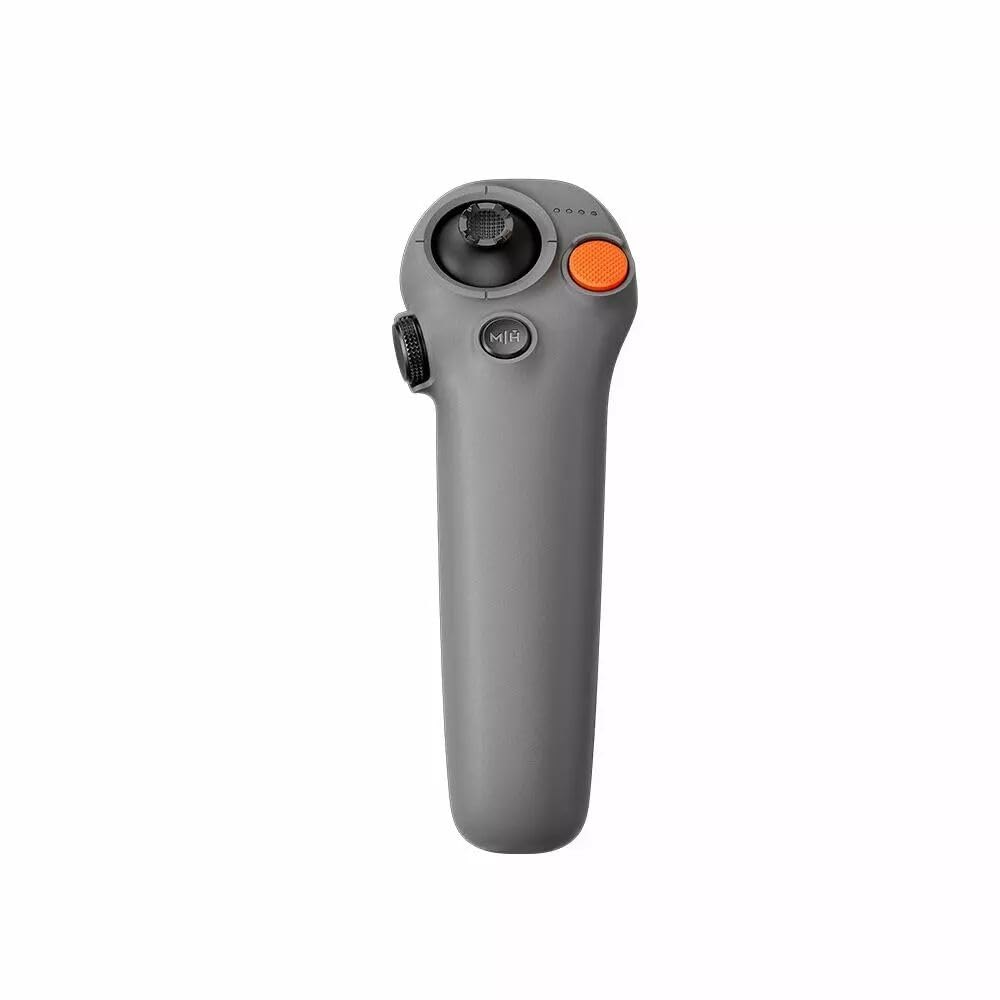
It is a small pistol-grip controller that weighs about 118 g and hangs from the included lanyard. Your index finger sits on the throttle trigger, which has a two-stage feel, and your thumb reaches a short row of buttons for takeoff and landing, mode switching and the emergency brake. The box contains only the controller and the lanyard; charging is over USB-C. DJI rates the 2600 mAh battery at around 10 hours, measured connected to Goggles 3, and a recharge takes about two hours.
Motion control and flying
The idea is simple: point your hand where you want to go and squeeze the trigger. The drone follows your wrist, turning as you rotate and climbing or descending as you tilt, while the trigger sets speed. Owners consistently describe it as the most natural way into first-person flight; most people are cruising confidently within a few minutes, which is something nobody says about a stick radio.
Safety is built in. One press of the brake button stops the drone and makes it hover wherever it is, which is the button you will reach for when a tree appears faster than expected. The controller flies in Normal and Sport modes only, so the flight controller always keeps the drone stable. On the Avata 2, DJI’s Easy ACRO features let you trigger flips, rolls and 180-degree drifts with a button press, but full Manual mode is out of reach. The AR cursor is the other useful touch: the controller becomes a pointer in the goggles, so you can change settings and play back footage without fiddling with the goggles’ own buttons.
Living with it
Compatibility is the part to get right before buying. DJI’s store lists the Avata 360, Neo 2, Avata 2, Mini 4 Pro, Air 3 and Neo. It always works through goggles: DJI Goggles 3 support the full list, and DJI’s Goggles N3 FAQ confirms the N3 works with the Avata 2 and Neo when paired with the RC Motion 3. It does not work with Goggles 2 or Goggles Integra, so owners of the original Avata need the older RC Motion 2 instead. It cannot be used with flight simulators, which is the main reason pilots who want to progress eventually add a stick controller. Holding your hand out in front of you for a whole battery can get tiring, so it is worth flying seated with your forearm resting on a knee or the arm of a chair.
Value for money
At the time of writing DJI lists the RC Motion 3 at $99, the same figure B&H shows, and it is often bundled with the Avata 2 and Neo 2 Motion Fly More combos, which is the cheapest way to get it. As a standalone purchase it costs half as much as the FPV Remote Controller 3, but the value depends on already owning compatible goggles, which cost several times more. If you are buying into DJI FPV from scratch, a combo that includes both goggles and controller is better value than separate purchases.
Alternatives
- DJI FPV Remote Controller 3: pick it if you want Manual mode, simulator practice and the stick skills that transfer to every FPV drone.
- DJI Goggles N3: the affordable goggles to pair with this controller if you fly an Avata 2 or Neo.
- DJI Goggles 3: the goggles you need if you want to fly a Mini 4 Pro or Air 3 with this controller.
The bottom line
The RC Motion 3 is the friendliest way into DJI’s first-person flying, and its brake button makes it forgiving for beginners. It is a companion to DJI goggles, not a standalone controller, and it caps your skills at Sport mode. Buy it for relaxed immersive flights, and add a stick controller if you get hooked.
.gap-review{margin:2.5rem 0 0}.gap-review h2{font-size:1.5rem;margin:0 0 1.25rem}.gap-verdict{background:#0E1A2B;color:#fff;border-radius:16px;padding:1.5rem 1.75rem}.gap-verdict__head{display:flex;gap:1.25rem;align-items:center}.gap-score{margin:0;width:84px;height:84px;border-radius:50%;background:#FF5A1F;color:#fff;display:flex;flex-direction:column;align-items:center;justify-content:center;font-weight:800;font-size:1.9rem;line-height:1}.gap-score small{font-size:.7rem;font-weight:600;opacity:.85}.gap-eyebrow{margin:0 0 .35rem;text-transform:uppercase;letter-spacing:.08em;font-size:.75rem;font-weight:700;color:#FF5A1F}.gap-verdict__line{margin:0;font-size:1.125rem;line-height:1.45}.gap-proscons{display:grid;grid-template-columns:1fr 1fr;gap:1.25rem 2rem;margin-top:1.5rem;padding-top:1.25rem;border-top:1px solid rgba(255,255,255,.15)}.gap-proscons h3{margin:0 0 .6rem;font-size:.9rem;text-transform:uppercase;letter-spacing:.05em;color:inherit}.gap-proscons ul{list-style:none;margin:0;padding:0}.gap-proscons li{position:relative;padding-left:1.6em;margin:0 0 .45em}.gap-proscons li::before{position:absolute;left:0;top:0;font-weight:800}.gap-pros li::before{content:’+’;color:#4ADE80}.gap-cons li::before{content:’2013′;color:#F87171}.gap-specs,.gap-faq{margin-top:2rem}.gap-specs h3,.gap-faq h3{font-size:1.2rem;margin:0 0 .75rem}.gap-specs table{width:100%;border-collapse:collapse;font-size:.95rem}.gap-specs th,.gap-specs td{text-align:left;padding:.65rem .9rem;border-bottom:1px solid #E2E8F0;vertical-align:top}.gap-specs th{width:38%;background:#F4F6F9}.gap-faq details{border:1px solid #E2E8F0;border-radius:10px;padding:0 1rem;margin:0 0 .6rem}.gap-faq summary{cursor:pointer;padding:.85rem 0;font-weight:600}.gap-cta{margin-top:2rem;padding:1.25rem 1.5rem;background:#F4F6F9;border-radius:16px;display:flex;flex-wrap:wrap;gap:.75rem;align-items:center}.gap-btn{display:inline-block;padding:.85em 1.5em;border-radius:10px;font-weight:600;text-decoration:none!important;background:#FF5A1F;color:#fff!important}.gap-btn–secondary{background:transparent;color:#0E1A2B!important;border:2px solid #E2E8F0}.gap-disclosure,.gap-note{font-size:.875rem;color:#4A5568;margin:.75rem 0 0}@media(max-width:640px){.gap-proscons{grid-template-columns:1fr}}
DJI RC Motion 3 review
8.2/10
madagear.com verdict
Buy it if you want first-person flight in DJI goggles with almost no learning curve; skip it if you want to fly acro, or if you do not own DJI Goggles 3 or Goggles N3.
What we like
- Point-to-fly control that most first-timers pick up within minutes
- One-press emergency brake that stops the drone and makes it hover
- AR cursor makes navigating the goggles menus quick
- Light at about 118 g with a rated 10 hours per charge
- Works with the Mini 4 Pro and Air 3 as well as DJI’s FPV drones
What we don’t
- Useless on its own: you must also own DJI Goggles 3 or Goggles N3
- Normal and Sport modes only, so no Manual or acro flying
- Does not work as a simulator controller
Specs at a glance
| Compatible drones | DJI Avata 360, DJI Neo 2, DJI Avata 2, DJI Mini 4 Pro, DJI Air 3, DJI Neo |
|---|---|
| Required goggles | DJI Goggles 3; DJI Goggles N3 also supported with the Avata 2 and Neo |
| Not compatible with | DJI Goggles 2 and DJI Goggles Integra |
| Flight modes | Normal and Sport |
| Frequency | 2.400–2.4835 GHz |
| Battery | 2600 mAh, built in |
| Operating time | Approx. 10 hours |
| Charging time | Approx. 2 hours at 5 V/2 A |
| Weight | Approx. 118 g |
Frequently asked questions
Can the DJI RC Motion 3 fly a drone without goggles?
No. DJI states that the RC Motion 3 alone cannot control a drone. It pairs with DJI Goggles 3, or with DJI Goggles N3 when you fly the Avata 2 or Neo, and the drone video is shown in the goggles.
Does the RC Motion 3 work with the DJI Mini 4 Pro and Air 3?
Yes, with DJI Goggles 3. That combination turns those camera drones into first-person fliers. DJI’s own list also includes the Avata 360, Neo 2, Avata 2 and Neo.
Can I do flips and rolls with the RC Motion 3?
Not in Manual mode, which this controller does not support; it only flies in Normal and Sport. DJI’s Easy ACRO features on the Avata 2 let you trigger flips and rolls, but for full acro control you need the DJI FPV Remote Controller 3.
Can I use the RC Motion 3 with a flight simulator?
No. DJI’s FAQ states it does not support flight simulators. If you want to practice in a simulator, the FPV Remote Controller 3 does.
DJI’s US list price for the controller alone; it cannot fly anything without DJI goggles. Price and availability checked on 2026-11-10.
madagear.com is reader-supported. When you buy through links on our site we may earn an affiliate commission, at no extra cost to you. This never affects what we recommend.


Reviews
There are no reviews yet.